
Hospital Management Software Guide 2027: How to Choose One
Wondering how to choose hospital management software in 2027? Get plain answers on patient records, booking, billing, HIPAA and NHS basics, and staff training.
By Biz E-Agency Inc. TeamUpdated 20 min read
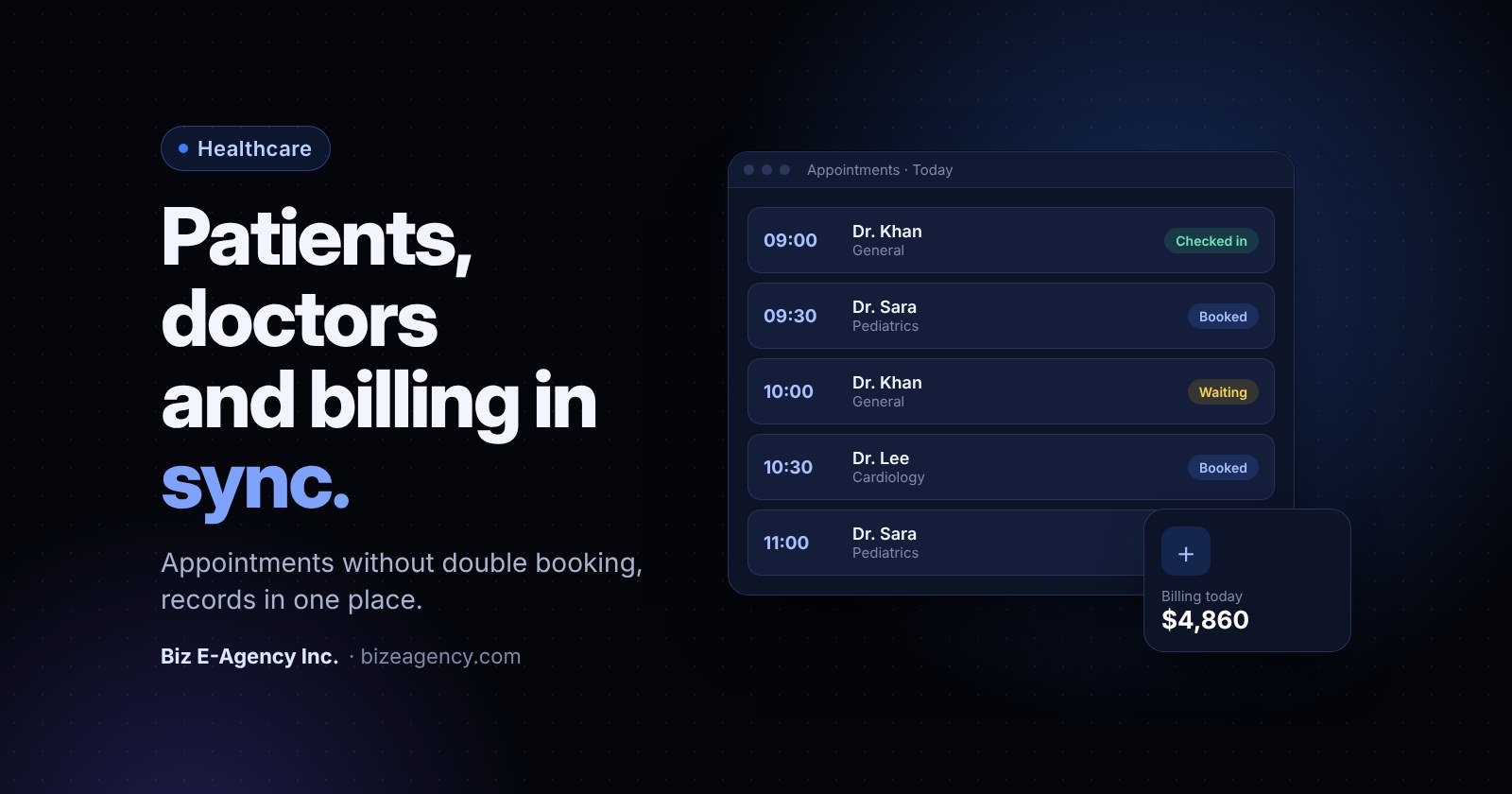
Quick answer: Hospital management software is a shared system that handles patient registration, doctor schedules, appointments and billing in one place. In 2027, choose one that fits your real front desk workflow, protects patient data with role-based access and audit logs, and comes with training. Test it with your own staff before you commit.
If your clinic still runs on paper registers, spreadsheets and a front desk diary, the right hospital management software can remove most of the daily friction. This guide answers the questions owners ask most, in plain language, and shows what to check before you buy in 2027.
This article covers business and operations topics only. It does not give medical advice, and nothing here replaces guidance from your clinical, legal or compliance advisers.
What is hospital management software?
It is a business system that runs the administrative side of a hospital, clinic, diagnostic centre or group practice. It records who the patient is, who they are seeing, when, what was charged and what was paid.
Some systems also cover pharmacy stock, lab orders and ward management. The core is always the same four things: patients, doctors, appointments and billing.
Think of it as the shared memory of your facility. Without it, that memory lives in people's heads, in notebooks and in several spreadsheets. When a receptionist is absent, the knowledge goes with them.
Do hospitals, clinics and small practices need different things?
Yes, though less than you might expect. A single-doctor clinic needs fast registration, a simple diary and clean receipts. A multi-doctor clinic adds shared schedules, room allocation and departmental reports. A hospital adds admissions, wards, departments and often several billing points.
A common mistake is buying for the size you hope to reach in five years. Buy for the next 12 to 24 months, but check that the system can add doctors, branches and departments without a rebuild.
Who uses it every day?
Different roles touch the system in different ways, and each needs its own view:
- Front desk staff: register patients, book appointments, take payments, print receipts.
- Doctors and nurses: see their own schedule, open patient records, add notes within their permissions.
- Billing and accounts: raise invoices, track unpaid balances, reconcile daily cash.
- Managers and owners: read reports on visits, revenue, doctor workload and no-shows.
Good hospital management software shows each person only what their job needs. That is both a usability feature and a privacy control.
How does patient registration and record keeping work?
Registration is the first step of every visit, so it sets the quality of everything that follows. A fast, accurate process means shorter queues, fewer duplicate records and fewer billing disputes.
What should a good registration screen capture?
Keep the first visit form short, then add detail over time. The basics usually include:
- Full name, date of birth, gender and contact number
- A unique patient ID generated by the system
- Address and an emergency contact
- Insurance or panel details, where relevant
- Consent to contact by phone, SMS or WhatsApp
- A photo or ID reference if your policy requires one
Keep mandatory fields few and meaningful. If your staff must fill ten fields before they can book a visit, they will type junk into half of them.
How do you stop duplicate patient records?
Duplicates are one of the most common data problems in any practice. The same person registers as "Ahmed Khan" on Monday and "Ahmad Khan" on Friday, and now two histories exist. A clinician could miss information because it sits in the other record.
Look for these safeguards:
- A search by name, phone number and date of birth before a new record is created
- A warning when a likely match already exists
- A controlled way to merge duplicates, restricted to senior staff and logged
What should an electronic patient record hold?
At the administrative level, a record links visits, doctors seen, invoices and payments. Depending on your setup and local rules, it may also hold clinical notes, prescriptions, referral letters and uploaded documents such as lab reports.
Decide early how much clinical content you want inside the software. Some facilities use a management system for operations and a separate clinical system for notes. Others want everything together. Either choice is valid, but it affects your privacy duties, so make it deliberately.
How do you stop double booking of doctors?
Use one live calendar per doctor that every booking channel writes to. When a slot is taken, it should disappear from every screen at once.
A busy clinic can have several staff booking the same doctor by phone, walk-in and online at the same time. Without a shared calendar, double booking is almost guaranteed.
Why does double booking happen?
Most double bookings come from a short list of causes:
- Two receptionists use separate diaries or spreadsheets.
- A doctor's leave or late start is not entered in the calendar.
- Walk-ins are squeezed in verbally and never recorded.
- An online booking form is not connected to the main schedule.
- Appointment lengths are not defined, so slots overlap in practice.
Which scheduling features should you ask about?
When you see a demo, ask the vendor to show these live rather than describe them:
- Doctor-wise calendars with working hours, breaks, leave and off days
- Different appointment types with different durations (new visit, follow-up, procedure)
- Slot locking so two users cannot take the same time
- Room or equipment allocation where a doctor needs a specific space
- Rescheduling and cancellation with a visible history
- Walk-in queue handling alongside booked slots
- Reminders by SMS, email or WhatsApp
On reminders: if you plan to message patients on WhatsApp, the official WhatsApp Business Platform requires opt-in for business-initiated messages and approved templates. Our guide to the WhatsApp Business API explains the rules. Never send reminders that reveal sensitive details about a patient's condition.
How can you reduce no-shows?
No-shows waste doctor time and leave other patients waiting for slots. Simple steps help: a reminder the day before, an easy way to reply and reschedule, and a note on the record when a patient repeatedly misses visits.
You can then decide on your own policy, such as a short deposit for certain services. Do not promise a fixed reduction in missed visits, because results depend on your patients and your process.
What about walk-ins and emergencies?
Real clinics are not perfectly scheduled. Your software should let the front desk add a walk-in to the queue quickly and let a doctor see the live list. Emergency cases follow your clinical protocols, not the software. The system supports you by recording what happened afterwards.
How does billing work in hospital management software?
When billing sits in the same system as registration and appointments, the visit itself creates the invoice. Nobody retypes the patient name or the doctor's fee.
That matters because billing errors cause lost revenue, patient frustration and long month-end clean-ups.
What should the billing module handle?
At a minimum, expect these capabilities:
- Itemised invoices for consultations, procedures, tests and medicines
- Doctor fee schedules and service price lists you can edit
- Discounts and waivers with a reason and an approver
- Partial payments and outstanding balances
- Cash, card, bank transfer and mobile wallet records
- Printed and digital receipts
- Daily cash closing and shift reports
- Tax lines where your country requires them
If you work with insurers or panels, ask how claims and co-payments are tracked. Requirements differ by country and by insurer, so confirm details against your own contracts.
Which controls protect your revenue?
Billing software should make mistakes harder, not just faster. Useful controls include role-based permission to edit or delete an invoice, a log of every change, and a rule that refunds need a manager's approval. These controls protect honest staff as much as they protect the business.
Which billing approach is best for you?
| Approach | Strengths | Weaknesses |
|---|---|---|
| Paper receipts and ledger | No setup cost, familiar | Easy to lose, hard to audit, slow reports |
| Spreadsheets | Flexible, cheap | Manual errors, no access control, duplicate entry |
| Standalone billing tool | Clean invoices | Not linked to appointments or records |
| Integrated hospital management software | One entry per visit, shared data, audit trail | Needs setup and staff training |
The integrated route takes more effort at the start. It usually pays back through fewer disputes, faster reconciliation and reports you can trust.
What does a smooth front desk workflow look like?
A patient should move from arrival to departure in a few clear steps, with no retyping. The front desk is where hospital management software succeeds or fails. If it slows reception down, staff will work around it, and workarounds destroy data quality.
How to map a patient visit step by step
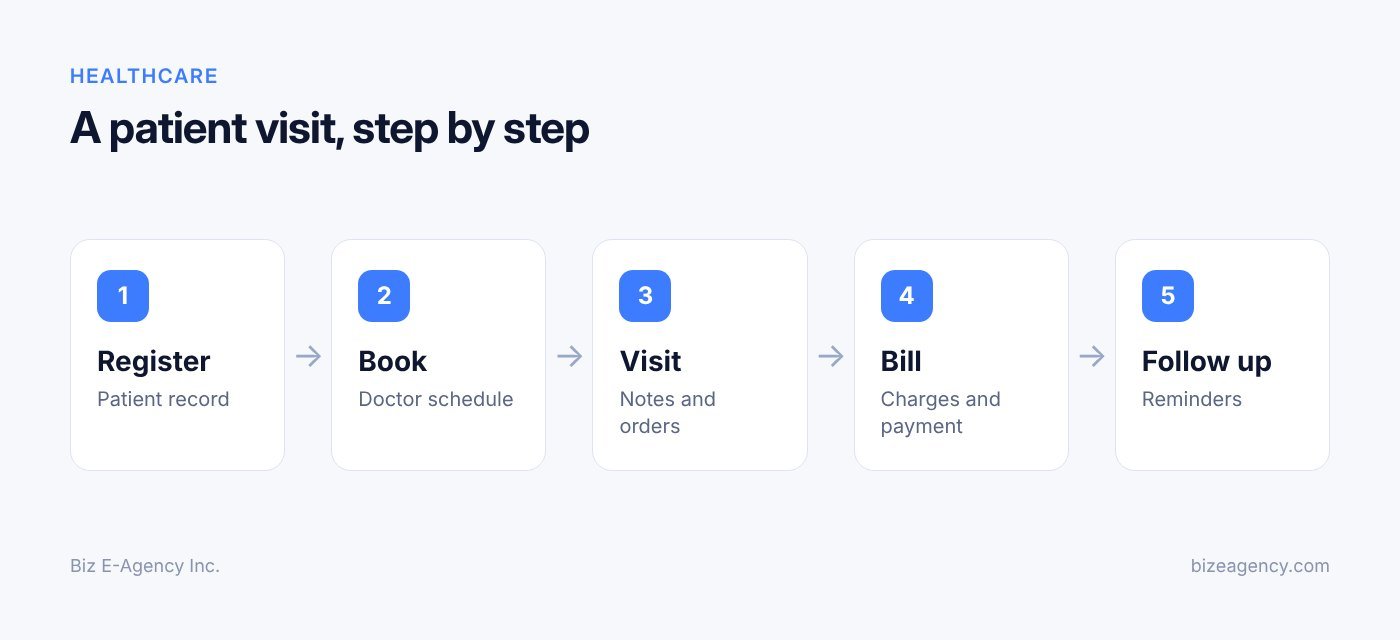
Map the real journey of a patient first, then check that the software matches it. A typical visit looks like this:
- The patient arrives or has an appointment. Staff search for the record by name, phone or ID.
- If new, staff register the patient. If returning, they confirm contact details.
- The visit is checked in and the patient joins the doctor's queue.
- The doctor sees the patient and the visit is marked complete.
- Services are added to the invoice automatically or by the doctor.
- The patient pays at the desk and receives a receipt.
- A follow-up appointment is booked if needed.
Count the clicks and screens in each step during your demo. If a common step needs more than a few actions, ask whether it can be shortened.
Which small features save the most minutes?
- Barcode or QR check-in for returning patients
- A live queue screen for the waiting area
- Quick-add for common services
- Keyboard shortcuts for busy desks
- Print layouts that match your letterhead
- A clear status for each patient (waiting, with doctor, billing, done)
None of these is exciting on its own. Together they decide whether a ten-person queue takes five minutes or twenty.
How do multiple desks and branches work?
If you have several counters or branches, ask how patient records are shared. A patient who visits Branch B should not need to register again if you want them treated as one person. At the same time, branch staff should see only what their role allows. Settle this policy before setup, because changing it later is harder.
What reports should you expect?
You should be able to answer everyday questions about revenue, visits and workload without a spreadsheet marathon. Software that only stores data is half useful. The other half is turning data into decisions.
Which reports do most owners ask for?
- Daily and monthly revenue by doctor, department and service
- Patient visits by day, new versus returning
- Appointment status: completed, cancelled, no-show
- Outstanding balances and ageing
- Cash collected by each staff member per shift
- Doctor workload and utilisation of available slots
- Top services by volume
Ask whether reports can be filtered by date and branch, and exported to Excel or PDF. Exports matter when your accountant needs figures for tax or audit.
Can you trust the numbers?
Reports are only as good as the entries behind them. If staff skip fields or book walk-ins on paper, the numbers will mislead you. Review a few reports against reality in the first month. If the totals do not match the cash drawer, find out why before you trust the dashboard.
How do you keep patient data private and secure?
Limit access by role, log every view and change, train your staff, and know the rules that apply in your country. Health data is among the most sensitive information a business can hold. A breach harms patients, damages trust and can bring legal consequences.
Privacy is not a feature you add at the end. It shapes how you choose, configure and run the system.
This section gives a general overview of the US and UK frameworks. It is not legal advice. Rules vary by country, state and type of organisation, so speak to a qualified adviser about your own duties.
What are the HIPAA basics in the United States?
HIPAA is a US federal law that sets standards for protecting health information held by covered entities (such as many healthcare providers and health plans) and their business associates. Two parts matter most for software choices.
The HIPAA Privacy Rule sets national standards for protecting individuals' medical records and other identifiable health information. It also gives patients rights over their records.
The HIPAA Security Rule sets standards for protecting electronic protected health information through administrative, physical and technical safeguards. In practice, that means policies, trained staff, controlled access, secure devices and technical protections such as access controls and audit logs.
Two practical points for US buyers:
- A software vendor cannot make your practice compliant on its own. Compliance depends on how your organisation uses the system, trains staff and manages risk.
- If a vendor handles protected health information for you, you will normally need a written agreement with them (a business associate agreement). Ask your legal adviser what applies to your setup.
Be cautious with any claim that hospital management software is "HIPAA certified." There is no official government certification of software for HIPAA. Ask vendors precisely what they provide, and verify it.
What about NHS and UK data guidance?
In the UK, health data is special category personal data under UK GDPR. The Information Commissioner's Office publishes UK GDPR guidance and resources that explain lawful bases, patient rights, security duties and breach reporting.
Organisations that handle NHS patient data usually need to complete the Data Security and Protection Toolkit, an online self-assessment against the National Data Guardian's data security standards. Private clinics that do not work with NHS data may have different requirements, so confirm with your regulator or adviser.
Which security controls should the software have?
Whatever your country, ask vendors and your own team to cover these basics:
- Role-based access: receptionists, nurses, doctors and managers see only what they need.
- Unique logins: no shared passwords, and strong password rules.
- Audit trail: a record of who viewed, changed or deleted what, and when.
- Encryption: data protected in transit and, where possible, at rest.
- Backups: regular, tested backups stored separately from the main system.
- Session timeouts: screens lock when staff step away.
- Secure hosting: clear answers on where data is stored and who can access it.
- Data export and deletion: a defined way to retrieve your data if you leave.
Is the human side of security really that important?
Yes. Most breaches involve people, not clever hacking. Staff clicking a phishing link, sharing a login or leaving a screen open cause more problems than rare technical exploits.
Build short, regular privacy reminders into your routine. Make it normal for staff to report mistakes quickly, without blame, so problems are contained early.
Should you choose cloud or local installation?
Both can work. Cloud systems reduce the hardware you maintain and make multi-branch access easier. Local installs keep data on your own servers, which some organisations prefer, but then you are responsible for backups, updates and physical security. Ask what each option means in practice for your staff and budget.
How much does hospital management software cost?
The price depends on your size, modules, hosting choice and support level, so there is no honest single number. Treat any vendor who quotes a price before understanding your setup with caution.
What factors change the cost?
- Number of users and doctors: more logins and calendars usually mean a bigger scope.
- Number of branches: each location adds configuration and training.
- Modules: registration and billing are the core. Pharmacy, lab and wards add more.
- Cloud or local install: hosting, servers and backups are paid for in different ways.
- Customisation: branding, custom reports and special workflows take extra work.
- Data migration: cleaning and importing old records depends on volume and quality.
- Training and support: ask what is included and what monthly maintenance costs.
What hidden costs should you look for?
Ask about update fees, charges for extra users, export fees if you leave, and the cost of changes after go-live. Get every answer in writing. A cheap quote that leaves out training or migration is not cheap once you add them.
Is hospital management software worth it for a small clinic?
For most clinics with more than one person at the front desk, yes. The value comes from fewer double bookings, fewer billing errors and reports you can rely on.
A one-doctor clinic with very low volume may manage with a simple tool for a while. Once you see queues, missed charges or arguments over who booked what, a shared system usually pays for itself in saved time.
Be honest about the effort too. You must clean your data, train your staff and change habits. Software cannot fix a process nobody agrees on.
How do you choose the right hospital management software?
Start with your needs, not the vendor's feature list. A clear process protects you from flashy demos and vague promises.
How to choose hospital management software step by step
- Write down your must-haves. List what must work on day one: registration, doctor calendars, billing, receipts, basic reports and role-based access. Keep nice-to-haves such as SMS reminders, lab modules and a patient portal on a separate list.
- Map your current workflow. Walk through a normal day with your front desk and doctors. Note where patients queue, where data is copied twice and where errors happen.
- Shortlist two or three options. Compare them against your must-have list, not against each other's marketing.
- Ask every vendor the same questions. Use the list below and get answers in writing.
- Run a trial with real staff. Let two or three people use it for a week with sample patients.
- Check security and support. Confirm access control, audit logs, backups, training and support window.
- Decide and plan the rollout. Name a project owner and set a go-live date before you sign.
Should you pick a ready-made or custom system?
| Question | Ready-made system | Custom-built system |
|---|---|---|
| Time to start | Usually weeks, often faster | Usually months |
| Fit to your workflow | Good for common needs, configurable | Built around your exact process |
| Upfront effort | Lower | Higher |
| Best for | Most clinics and small hospitals | Unusual workflows or large groups |
| Changes later | Configuration or requests | Planned development |
Many facilities start with ready-made software that can be branded and customised, then add custom features as needs become clear. If your needs are unusual, read our custom software development guide to see how a bespoke project works.
What questions should you ask every vendor?
- Can I see a live demo using my own workflow?
- Who owns the data, and how do I export it?
- Where is data hosted, and what backups exist?
- How do roles and permissions work?
- Is there an audit log?
- What training and support are included, and for how long?
- How are updates handled, and do they cost extra?
- What happens if I stop using the service?
- Can you provide references I can speak to directly?
If a vendor will not explain security clearly, treat that as a red flag. Never test with real patient data in a trial unless you are sure about the security arrangements and your legal position.
What does Biz E-Agency offer for clinics and hospitals?
Biz E-Agency Inc. is a software, AI and automation company based in Orlando, Florida. Our Hospital CRM & Management system manages patients, doctors, appointments and billing in one place. A free trial is available, and our team can set up a demo so you can see the workflow before you decide.
Like our other ready-made products, it can be branded and customised, installed in the cloud or locally, and the team can migrate your existing data and train your staff before go-live. You can see the wider range on our software page.
We want to be clear about compliance. We do not claim that the product is HIPAA certified, and no software alone can make a practice compliant. If you have specific legal or regulatory needs, tell us during the demo and we will discuss what is and is not supported. Your own legal or compliance adviser should confirm your obligations.
If your practice also manages referrals, marketing contacts or corporate clients, you may find our Business CRM and our guide to CRM software for small business useful alongside it.
How do you roll it out without disrupting patient care?
Treat go-live as a small project with an owner, a timeline and a plan for the first weeks. Good software can still fail through a rushed rollout.
How to roll out hospital management software step by step
For ready-made systems, deployment can often take one to two weeks, though your own timeline depends on data volume, branches and customisation. A typical sequence looks like this:
- Plan: name a project owner, agree the scope and set a go-live date.
- Configure: enter doctors, departments, service prices, working hours and user roles.
- Migrate data: clean and import existing patient lists and balances.
- Test: run sample patients through registration, booking, billing and reporting.
- Train: teach each role what they need, with hands-on practice.
- Go live: start on a quiet day, with extra support on hand.
- Review: meet after one week and one month to fix issues.
How should you migrate old data?
Old data is usually messier than expected. Before importing, remove obvious duplicates, fix phone number formats and decide which history is worth keeping. Always keep a copy of the original files. After import, spot-check a sample of records against the source to make sure names, dates and balances match.
Should you run old and new systems in parallel?
Only briefly. Running both reduces anxiety but doubles the work, so keep it to a few days. A better approach is a clear cut-off date with a printed fallback plan, such as a simple downtime form, in case of a power or internet failure.
Which rollout mistakes should you avoid?
- Going live during your busiest week
- Training only managers and not front desk staff
- Leaving old paper habits in place "just in case"
- Skipping role setup and giving everyone full access
- Not naming a person staff can ask for help
How do you train staff so they actually use it?
Train by role, practise real scenarios and keep supporting people after go-live. Training is not a single session. It is a short, repeated process that fits around clinical hours.
Why train by role instead of by feature?
Receptionists need registration, booking and billing. Doctors need their schedule and the records they are permitted to open. Managers need reports and user management. Training everyone on everything wastes time and confuses people.
How do you build confidence?
Use a training environment with fake patients. Ask staff to complete real scenarios: book a follow-up, reschedule a visit, take a part payment, handle a refund request. Repetition builds speed far better than slides.
What reference material helps?
- A one-page quick guide for each role
- A short list of "if this happens, do this" rules
- Contact details for the support person
- A reminder of privacy rules, such as never sharing logins
What support should you expect after go-live?
Expect questions in the first two weeks. Schedule a short check-in after the first week and again after a month. Collect the complaints, fix what can be changed in configuration, and retrain on what staff keep getting wrong. Ask your vendor what training and support window is included and what monthly maintenance options exist.
What mistakes do clinics make with hospital management software?
The same errors appear again and again, whatever the clinic size. Avoiding them saves time and money.
- Choosing on price alone: a cheap system that staff dislike costs more in lost time.
- Ignoring privacy during selection: ask about access control, audit logs and backups at the start, not after go-live.
- Skipping the workflow review: software that does not match how you work gets bypassed.
- Overloading the first release: launch the core, then add modules in stages.
- Poor data cleaning: importing duplicates only moves the mess into a new system.
- No owner: without a named project lead, small issues drift and morale drops.
- Treating compliance as the vendor's job: you remain responsible for your policies and training.
What will change in 2027 and 2028?
Nobody can predict this precisely, so treat the points below as things to watch, not promises. Expect patients to keep asking for easier booking, clearer reminders and faster payment options.
Here is what you should likely plan for when you buy in 2027:
- More messaging channels. Patients may expect booking and reminders on the apps they already use. Check that your system can grow here without exposing sensitive details.
- More automation of routine tasks. Expect more tools that draft reminders, summarise queues or flag billing gaps. Ask vendors what is automated, who reviews it and how errors are caught.
- Higher privacy expectations. Regulators and patients will likely keep paying attention to how health data is stored and shared. Watch for updates from the bodies linked above, and keep your policies current.
- Tighter links between systems. Clinics may need to share data with labs, pharmacies and insurers. Ask whether the software can export and connect cleanly.
- Cloud and remote access. Multi-branch and remote work are likely to stay common, so check hosting and access controls carefully.
The safest move is to choose software that can be configured and extended, with a vendor who is clear about support and updates. That way you can adapt in 2028 without starting over.
Next steps
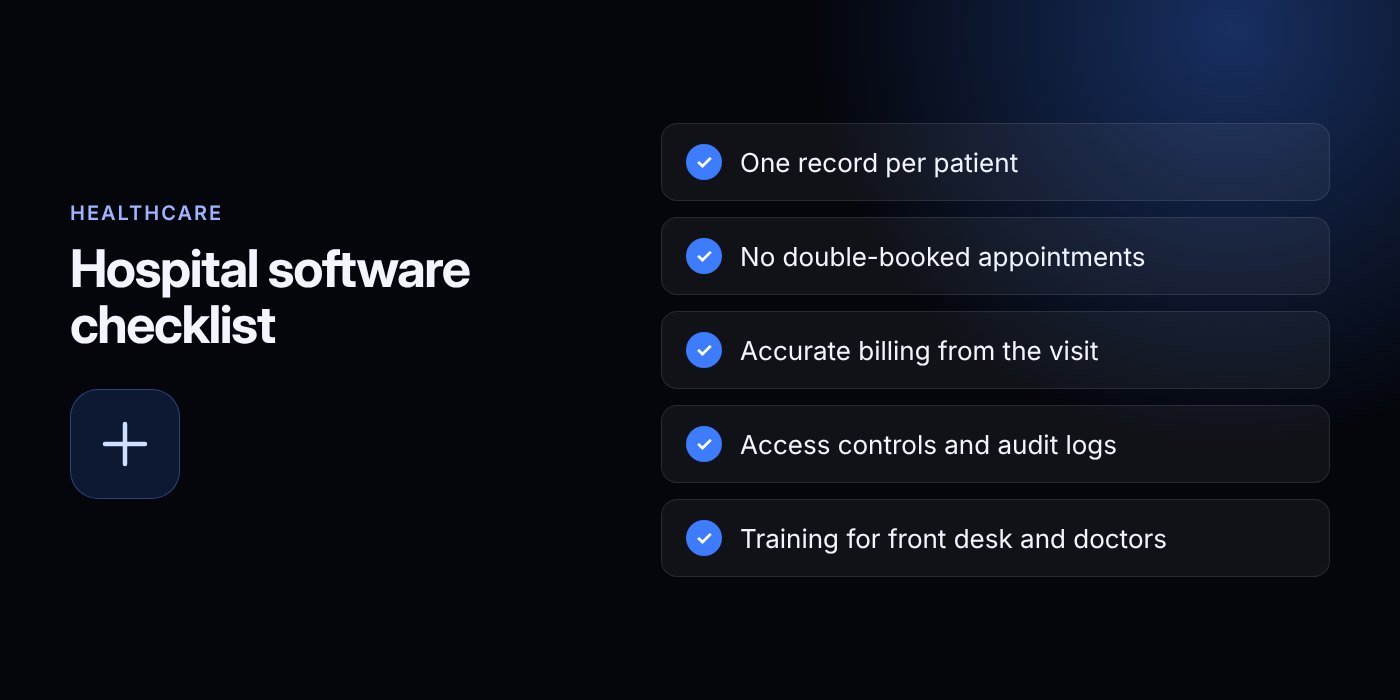
Start small and practical when choosing hospital management software in 2027. Write down your must-have features, map your front desk workflow and shortlist two or three systems. Ask each vendor for a demo built around your real scenarios, and test security and training answers in writing.
If you would like to see how our system handles patients, doctors, appointments and billing in one place, explore the Hospital CRM & Management page, or create an account to get started. You can also read about our services and see how we work on the about page.
Ready to talk it through? Contact our team by email at info@bizeagency.com, on WhatsApp at +1 321-318-8127 or by phone at +1 650-502-9475. We can arrange a free trial and demo, and we are happy to answer questions in English, Urdu or Hindi. Pricing is confirmed in writing before any work starts, and every project includes handover, training and a support window.
Frequently asked questions
Do I need hospital management software for a small clinic?
If more than one person books visits or takes payments, a shared system usually saves time and reduces errors. A very small, low-volume practice can start simple, but queues, missed charges and booking clashes are signs it is time to move.
Can the software tell two staff members apart when they edit a record?
Yes, if each person has a unique login and the system keeps an audit trail. You should be able to see who viewed, changed or deleted an entry and when. Avoid shared passwords, because they make this impossible.
Is there such a thing as HIPAA certified software?
No official government certification of software for HIPAA exists. Compliance depends on how your organisation uses the system, trains staff and manages risk. Ask vendors exactly which safeguards they provide and check them with your adviser.
How long does it take to start using a ready-made system?
Ready-made systems can often be deployed in one to two weeks. Your own timeline depends on data volume, branches, customisation and how quickly your staff can be trained.
Should I move my old patient records into the new system?
Usually yes, but clean them first. Remove duplicates, fix phone formats and decide which history is worth keeping. Keep a copy of the original files and spot-check the imported records.
What should I check before buying in 2027?
Check workflow fit, role-based access, audit logs, backups, data export, training and the support window. Ask for a live demo with your own scenarios and get every answer in writing.
Need help putting this into practice?
Tell us what is slowing your business down. We reply within one business day with a clear fix.