
Custom Software Development Guide 2027: Build, Buy or Hire?
Wondering if custom software is worth it in 2027? Get straight answers on build vs buy, cost factors, timelines, ownership and choosing a partner.
By Biz E-Agency Inc. TeamUpdated 19 min read
Quick answer: Custom software development means building a system around how your business actually works, instead of bending your team to fit a generic tool. For 2027, the smartest route for most small and mid-size firms is to buy or customize a proven ready-made system first, and build fully custom only where your workflow is truly unique. Agree scope, price, ownership and support in writing before any work starts.
You are probably reading this because you are weighing custom software development against a tool you can buy today. Maybe your spreadsheets are breaking, your licence fees keep climbing, or your staff keep re-typing the same data. This guide answers the questions owners ask us most, in plain language, so you can decide what to do in 2027 and beyond.
What is custom software development?
Short answer: it is the process of designing and building software for one organization's specific needs, rather than buying a product made for everyone.
It might be a point of sale for a restaurant group, a customer database that matches your sales process, or an internal portal that replaces five spreadsheets. The requirements come from your workflow, not from a vendor's product roadmap.
In practice, custom software development sits on a spectrum. At one end you build everything from scratch. At the other end you start from a proven, ready-made product and customize it: your branding, your fields, your reports, your integrations. Many businesses land in the middle, and that is often the smartest place to be.
What can you actually build?
- Business systems: ERP, CRM, POS, inventory, booking and compliance tools that run daily operations.
- Web apps: browser-based software such as customer portals, dashboards, marketplaces and admin panels.
- Mobile apps: iOS and Android apps for customers, field staff or delivery teams.
- Websites: custom-designed sites with your own structure, content system and integrations, rather than a stock template.
- Integrations and automation: connections between your tools, plus AI assistants and workflow automation. See our AI automation page for examples.
How does custom compare with ready-made and no-code?
| Option | Best for | Main strength | Main limit |
|---|---|---|---|
| Ready-made (off the shelf) | Standard processes | Fast to start, lower upfront effort | You adapt to the tool |
| Ready-made plus customization | Most small and mid-size firms | Proven core, tailored edges | Core product limits still apply |
| Fully custom build | Unique workflows or a product you sell | Exact fit, full control | More time and planning |
| No-code or low-code | Simple internal tools, prototypes | Quick to test an idea | Scaling and ownership limits |
Should I build custom software or buy a ready-made product?
Short answer: buy when your process is common and speed matters most. Build when your workflow is your edge, or when generic tools keep costing you time and money.
Neither answer is always right. The honest approach is to test your situation against a few clear criteria before you spend anything.
When is buying enough?
Buy ready-made software when the market already serves your process well. Accounting, email, payroll and basic project tracking are good examples. If a product covers around 80 percent of what you need and the rest is minor, adapting your habits is cheaper than building.
Also buy when speed matters most. A tool you can use next week often beats a perfect one that arrives in three months.
When does custom software development pay off?
Consider a custom build when one or more of these are true:
- Your workflow is a competitive advantage and generic tools would flatten it.
- You are paying for several tools that do not talk to each other, and staff re-key data between them.
- Per-user licence fees grow faster than your revenue as you add staff or branches.
- You need software that fits local rules, languages, currencies or tax formats.
- You want to sell the software itself as a product or service.
- You need control over data location, security and future changes.
What is the middle path?
For many owners, the best answer is a proven system with tailored features. Biz E-Agency offers ready-made products that can be branded and customized, installed in the cloud or locally, with data migration and staff training before go-live. You get a working core quickly and shape the rest around your operation. Browse the options on our software page.
Can I score my own situation?
Yes. Answer each question yes or no. Mostly yes answers point toward a custom build.
- Does a generic tool force workarounds your team complains about every week?
- Do you need features no vendor offers?
- Will the system hold data that is central to your business value?
- Do you expect to grow into more users, branches or countries?
- Can you commit time from a decision maker during the project?
Is custom software worth it for a small business?
Short answer: often yes, but only when it solves a clear, costly problem. A small business rarely needs a huge build. It usually needs one well-made system that removes its biggest daily headache.
Small firms win when they start small. Pick the process that costs you the most time or money, such as order tracking, invoicing or customer follow-up, and fix that first. A focused first release is cheaper, easier to test and easier to love.
Be cautious if your needs are standard. If a ready-made tool already does the job and your team is happy with it, a custom build may be money you did not need to spend. The test is simple: will this system save more time or earn more money than it costs to own?
Think about total ownership too. Hosting, maintenance and updates continue after launch. A system that is slightly less perfect but cheaper to run can beat a perfect one you cannot afford to keep healthy.
What do custom ERP, POS and CRM systems do for my business?
Short answer: they run your daily operations. An ERP joins your back office, a POS handles every sale, and a CRM tracks every customer. Business systems are where custom software development usually delivers the most day-to-day value.
What is a custom ERP?
An ERP (enterprise resource planning) system joins finance, inventory, purchasing, production, HR and reporting in one database. Large off-the-shelf ERPs are powerful but heavy, and they often need long configuration projects. A custom or modular ERP lets you start with the two or three modules that hurt most, such as inventory and invoicing, then add others later.
If you run production, our factory CRM and management system is a practical starting point, and the factory management software guide explains what to look for.
What should a custom POS include?
A point of sale system must be fast, simple for staff, and reliable when the internet drops. Restaurants need table management, kitchen display, split bills and modifiers. Retail needs barcode scanning, stock counts, supplier orders and multi-branch reporting. Custom features matter here: loyalty rules, local tax handling, receipt layouts and integrations with accounting.
Start with our restaurant POS or mart and retail POS, then read the restaurant POS system guide or the retail POS system guide to compare features. If you accept cards, learn the basics of the PCI Security Standards Council requirements, since payment data handling carries obligations.
What makes a custom CRM useful?
A CRM (customer relationship management) system tracks leads, customers, conversations and follow-ups. The best CRM is the one your team actually updates. That usually means fewer fields, clear pipeline stages and automation for repetitive tasks such as reminders and quotes.
Our business CRM covers sales and service teams, and the CRM software for small business guide walks through selection. Sector-specific versions exist too, such as the hospital CRM and management system and the school management system.
Which system should I build first?
Do not try to build everything at once. Pick the process that costs you the most time or money today, build that well, and let the rest follow. A phased plan also makes budgeting easier and reduces risk.
Do I need a web app, a mobile app or a website?
Short answer: it depends on what your users must do. Use a website to explain and attract, a web app for tools people log into, and a mobile app when you need phone features or daily engagement.
Business owners often ask for "an app" when they need something else. Choosing the right format shapes your cost, timeline and user experience, so settle it early.
When is a web app the better choice?
A web app runs in the browser on any device. There is nothing to install, updates reach everyone at once, and one codebase serves desktop and mobile users. For dashboards, portals, booking tools and internal systems, a responsive web app is often the most practical choice.
When do you really need a mobile app?
Build a mobile app when you need device features or daily engagement. Examples include camera and barcode scanning, push notifications, offline mode, GPS tracking for drivers or sales reps, and a branded presence on a customer's home screen. Apps also need to pass store review, so read the Apple App Review Guidelines early, because they affect design and features.
When is a website enough?
If your goal is to explain services, rank in search and capture enquiries, a well-built website is the right tool. A custom website means your own design, structure and content system. Good sites should also be fast and accessible. Google's Web Vitals guidance explains the loading, interactivity and stability signals that shape user experience, and the WCAG accessibility standard sets the benchmark for inclusive design.
How do the formats compare?
| Format | Install needed | Best use | Typical timeline (estimate) |
|---|---|---|---|
| Custom website | No | Marketing, content, lead capture | 2 to 4 weeks |
| Web app | No | Portals, dashboards, internal tools | 6 to 12 weeks, scope dependent |
| Mobile app | Yes (app stores) | Device features, customer engagement | 6 to 12 weeks, scope dependent |
| Ready-made system | Cloud or local | Standard operations | 1 to 2 weeks to deploy |
How does a custom software project work, step by step?
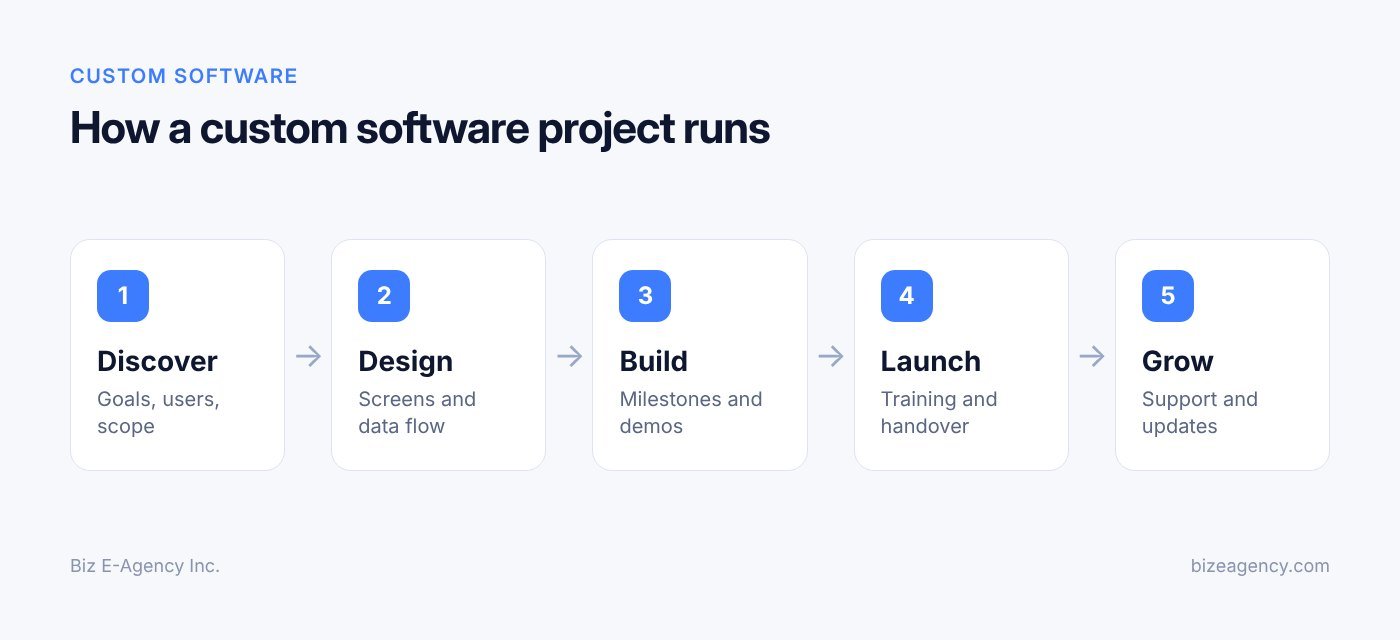
Short answer: a good project moves through four stages: Discover, Design, Build, then Launch and grow. Whichever partner you choose, expect a similar structure. At Biz E-Agency, projects follow exactly these four stages.
Stage 1: What happens in Discover?
Discovery is where a project is won or lost. The team learns your business, your users, your current tools and your goals. You talk through problems, list must-have features, and agree on what success looks like.
Typical outputs include a written scope, a feature list ranked by priority, a list of integrations, and a plan for moving existing data. Skipping discovery to "save time" almost always costs more later.
Stage 2: What happens in Design?
Design turns the scope into something you can see. You review wireframes (simple layouts) and then visual designs for key screens. This is the cheapest moment to change your mind, because moving a button on a drawing costs far less than rewriting working code.
Design also covers data structure, user roles and permissions, and the technical approach. You should sign off on the designs before building begins.
Stage 3: What happens in Build?
Development happens in short cycles, with working versions you can test along the way. Good teams show progress regularly instead of disappearing for weeks. Your job is to give timely feedback and answer questions quickly.
During the build, expect testing for functionality, security basics, browser and device compatibility, and performance. The OWASP Top 10 is a widely used awareness document for web application security risks, and a competent team will know it well.
Stage 4: What happens at Launch and grow?
Launch is not the end. It includes final testing with real data, data migration, staff training, go-live support and a monitored first period. After launch you review how people use the system and plan improvements.
Every Biz E-Agency project includes handover, training and a support window, and monthly maintenance plans are available afterwards.
How do I stay involved without slowing things down?
- Name one decision maker who can approve work quickly.
- Attend short review sessions at each milestone.
- Involve two or three real end users early, not only managers.
- Keep requests in writing so nothing is lost.
How to scope a custom software project step by step
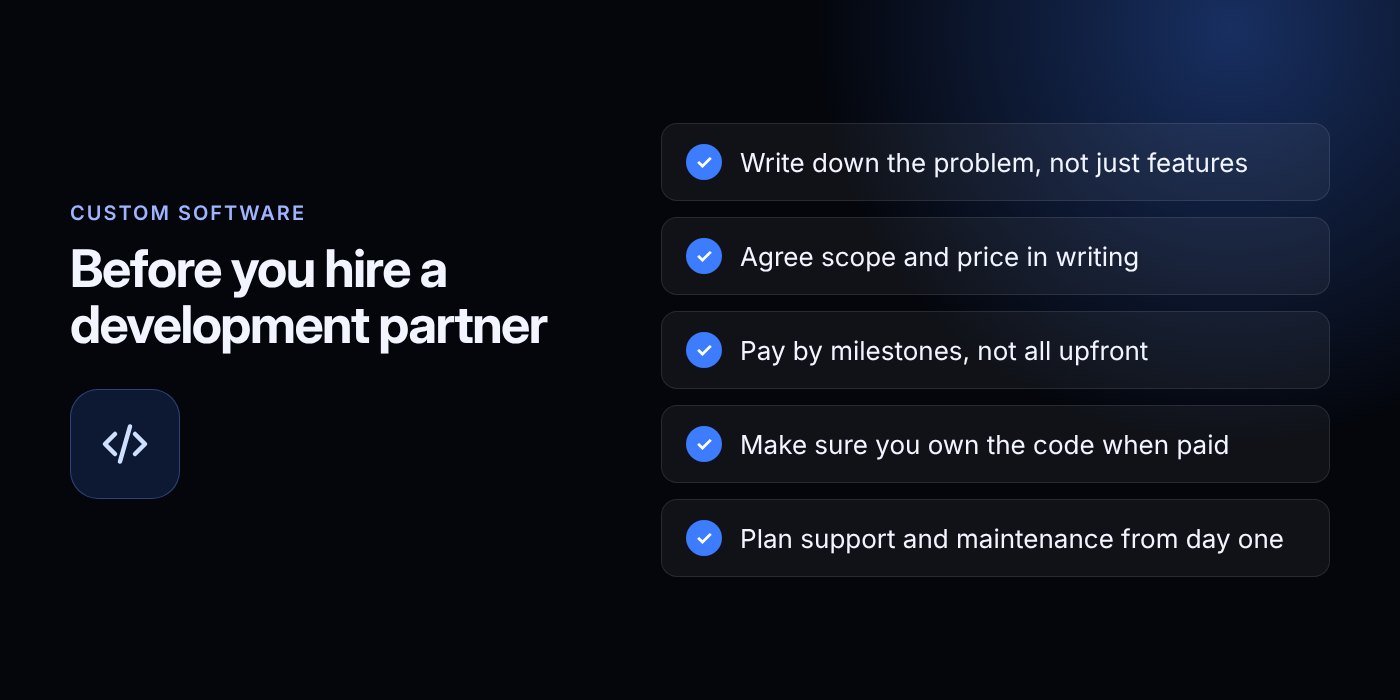
Short answer: write down your problems, rank your needs, list users and integrations, and define how you will test each feature. Scope is the list of what will and will not be built, and a clear one is your best protection against overruns.
Vague scope is the number one cause of troubled projects. Follow these steps before you ask for quotes:
- Write the problems in plain language. For example: "Orders from three branches are tracked on paper and take two days to reconcile." A good partner turns problems into features, and may suggest simpler solutions than the ones you imagined.
- Sort every requirement into three buckets. Must have, should have and could have. Build the first bucket first.
- List every type of user. Owner, manager, cashier, accountant, customer, driver. For each, note what they can see and do.
- Describe the key workflows. For example: "customer places order, kitchen receives ticket, payment is recorded, stock is reduced."
- List your integrations. Accounting, payment gateways, email, WhatsApp, delivery platforms, receipt printers and scanners.
- Decide what happens to existing data. Clean spreadsheets migrate easily. Messy ones need time, and that time belongs in the plan.
- Write acceptance criteria. For each major feature, define how you will know it works.
What do the three buckets look like in practice?
- Must have: the system is not usable without it.
- Should have: important, but the launch can proceed without it.
- Could have: useful later, once the core is proven.
Many owners are surprised how much value arrives from a small, well-made core.
Why do integrations and data cause delays?
Many projects stall on integrations. If you plan customer messaging, our WhatsApp Business API guide explains the official platform and its rules, which helps you plan the work realistically.
What does a good acceptance criterion look like?
"Staff can close the day in under five minutes" is testable. "The system should be easy" is not. Acceptance criteria turn opinions into checks, and they stop arguments at handover.
How much does custom software development cost?
Short answer: it depends on scope, and no responsible vendor can quote accurately without understanding yours. Any figure in a blog post would be a guess, so here are the factors that move the price, so you can judge quotes sensibly.
What are the main cost drivers?
| Factor | Why it affects budget |
|---|---|
| Number of features and screens | More functions mean more design, build and testing |
| Complexity of rules | Pricing logic, tax rules and approvals take careful work |
| Integrations | Each outside system adds setup, testing and ongoing checks |
| Platforms | Web only, or web plus iOS and Android, changes effort |
| User roles and permissions | More roles mean more screens and test cases |
| Data migration | Volume and cleanliness of old data matter |
| Security and compliance needs | Payments, health or education data raise the bar |
| Design depth | Custom visuals and animations take longer than simple layouts |
| Hosting and infrastructure | Cloud, local install or both, plus backups |
| Training and support level | Larger teams and longer support windows add effort |
What costs come after the build?
Plan for the full cost of ownership, not only the first invoice. Running costs commonly include hosting, domain and SSL, third-party service fees (such as SMS, email or payment gateways), maintenance, and future improvements. Ask your partner to list these clearly so there are no surprises when you budget for 2027.
How can I keep the budget under control?
- Launch a smaller first version and expand once it earns its place.
- Customize a ready-made system instead of starting from nothing.
- Fix scope before work starts, and handle changes through written change requests.
- Prefer milestone payments tied to delivered work.
- Reserve a modest contingency for items discovered during the build.
At Biz E-Agency, pricing is confirmed in writing before work starts, and payments are split into milestones. That is a good standard to expect from any partner.
Should I worry about a very low quote?
Yes, look closer. An unusually low quote often means missing features, thin testing or hidden extras. Compare quotes line by line, not by total. If one proposal skips discovery, testing or handover, it is not really cheaper.
How long does a custom software project take?
Short answer: about 1 to 2 weeks for a ready-made system, 2 to 4 weeks for a custom website, and 6 to 12 weeks for custom software or apps, depending on scope. These are typical estimates, not promises, and your own project may differ.
Timelines depend on scope, how fast you give feedback, and how many integrations are involved.
- Ready-made systems: about 1 to 2 weeks to deploy, including setup and branding.
- Custom websites: about 2 to 4 weeks.
- Custom software or apps: about 6 to 12 weeks, depending on scope.
What slows a project down?
Most delays are not technical. They come from slow approvals, scope that keeps changing, missing content or data, and too many decision makers. Appoint one owner, supply materials on time, and batch your feedback.
What speeds a project up?
Start with a focused first release. Use proven components where they fit. Test with real users early. Keep a written list of later ideas so they do not creep into the current build. Our projects page shows the kinds of systems we build.
When should I go live?
Avoid going live during your busiest week. For a POS, choose a quiet day, run old and new systems side by side briefly if needed, and train staff before opening. A calm launch beats a fast one.
Who owns the code and the data?
Short answer: you should, but only if your agreement says so. Settle ownership in writing before you pay a deposit. At Biz E-Agency, the client owns the code and designs once the project is paid in full.
Who owns the source code and designs?
Your agreement should state who owns the source code, designs and documentation once the work is paid for. Ask any partner for the same clarity.
Be careful with third-party and open-source components. They usually carry their own licences, which should be listed. Ask for a simple inventory so you know what your system depends on.
Who owns the data, and can I take it with me?
Your business data belongs to you. Make sure you can export it in a standard format at any time. Confirm where it is hosted, who has administrator access, and how backups work.
Who should hold the hosting and accounts?
You should hold, or at least have documented access to, your domain, hosting account, app store accounts and repositories. If a vendor registers everything in their own name, you can end up locked out. Insist on handover of all credentials at the end of the project.
What belongs in a proper handover?
A proper handover includes the source code, deployment steps, an admin guide, a list of integrations and keys, and training for your team. This protects you if staff or vendors change later.
What happens after launch: maintenance and support?
Short answer: the software needs regular care. Browsers update, phones update, payment rules change, and your business evolves. Without maintenance, even a good system slowly decays.
What does maintenance cover?
- Security updates and dependency upgrades.
- Bug fixes and performance checks.
- Backups and restore testing.
- Monitoring uptime and errors.
- Small improvements and content changes.
- Compatibility with new devices, browsers and OS versions.
What is the difference between a support window and a maintenance plan?
A support window is a set period after launch when fixes for defects are handled as part of the project. A maintenance plan is an ongoing monthly arrangement for updates, monitoring and improvements. Biz E-Agency includes a support window with every project and offers monthly maintenance plans for the long term.
How should I plan for growth?
Review your system every quarter. Ask what staff find slow, what reports are missing, and which new needs have appeared. Small, regular improvements cost less than a large rebuild every few years. If you want automation or AI features later, such as an assistant that answers common questions, the AI voice agent guide shows what is possible.
What will change in 2027 and 2028?
Short answer: expect more AI built into everyday business software, more attention to data security and privacy, and higher customer expectations for speed and mobile use. None of this is certain, so treat it as a planning guide, not a forecast.
Nobody can predict the next two years exactly. Still, a few directions look likely, and it helps to build with them in mind.
Will AI features become standard?
Expect AI assistants, automated replies and smart reports to appear more often inside business systems. Watch for tools that draft messages, summarize records or answer routine customer questions. When you plan a build in 2027, ask whether your system can connect to such features later, even if you do not need them on day one.
Will security and privacy rules get stricter?
Likely, in many regions. Rules about personal data, payments and online accounts tend to tighten over time, and they differ by country. Choose a partner who treats security as part of every stage, and keep your data exportable so you can adapt if requirements change.
Will customers expect more from your systems?
Expect yes. Customers increasingly want fast pages, mobile-friendly screens, quick replies on messaging apps and self-service options. A system that is hard to change will struggle to keep up, so favor flexible, well-documented builds.
How do I future-proof a build for 2027 and beyond?
- Keep the design modular so you can add features without a rebuild.
- Use open, well-supported technology rather than obscure tools.
- Insist on documentation and full code ownership.
- Plan a yearly review and a maintenance budget.
- Make sure data can be exported and integrations can be swapped.
How do I choose a custom software development partner?
Short answer: pick the team with relevant experience, a clear process, written terms and real support after launch. The right partner matters more than the right technology.
What should I look for?
- Relevant experience: ask to see projects similar in type or complexity, and speak with references if you can.
- A clear process: you should be able to explain their stages back to a colleague.
- Written scope and pricing: quotes should list deliverables, milestones and exclusions.
- Communication: who is your contact, how often will you get updates, and in which language?
- Ownership terms: code, designs, data and credentials, as covered above.
- Testing and security habits: ask how they test and how they handle sensitive data.
- Support after launch: training, a support window and maintenance options.
- Stability: a team that will still be around in two years.
What should I ask in the first call?
- How do you handle changes after scope is agreed?
- What do you need from us each week?
- Who will actually build the software, and where are they based?
- What happens if we want to move to another vendor later?
- Can we see a demo of something similar?
What are the red flags?
Walk away or ask more questions when a vendor promises a fixed price with no discovery, refuses to put terms in writing, will not discuss ownership, avoids showing past work, or pushes you to skip testing. Be wary of guarantees about sales or rankings, because no honest team can promise outcomes that depend on your market.
Why does a flexible team help?
Small and mid-size businesses often value direct access to the people building the product. Biz E-Agency works in English, Urdu and Hindi, and serves clients in the USA, UK, Canada, UAE, Pakistan and elsewhere. Read more about the team on our about page or see the full range on our services page.
Next steps
Custom software development works best when you treat it as a business project, not a technology experiment. Define the problem, decide between building and buying, set a clear scope, and choose a partner who puts price, ownership and support in writing.
A practical way to begin in 2027:
- Write down your top three operational problems.
- List the tools and data you use today.
- Decide whether a customized ready-made system could solve them faster.
- Book a conversation to review options, scope and timeline.
Explore our services for the full picture, then contact the Biz E-Agency team by email at info@bizeagency.com, on WhatsApp at +1 321-318-8127 or by phone at +1 650-502-9475. For ready-made products, ask about a free trial and a demo set up by our team. You can also keep learning on the blog.
Frequently asked questions
Can a small business really afford custom software?
Often, yes, if you start small. Build or customize one system that fixes your costliest problem, then add features later. Ask for a written scope with milestone payments so you can see what you pay for at each stage.
Will I own the software once it is built?
You should, but it must be written into your agreement. At Biz E-Agency, the client owns the code and designs once the project is paid in full. Also confirm you hold your domain, hosting and app store accounts.
Can I change the software later as my business grows?
Yes, if it was built with growth in mind. A modular design, clear documentation and a maintenance plan make later changes cheaper. Reviewing the system every quarter helps you plan improvements early.
What should I prepare before talking to a developer?
Write down your top three problems, the tools you use now, who will use the system, and any data to move. Rough notes are enough. A good partner will turn them into a written scope during discovery.
What happens if something breaks after launch?
Defects found soon after launch are covered by the support window included with every Biz E-Agency project. Longer term, a monthly maintenance plan covers updates, monitoring and fixes. Agree this in writing before you sign.
Is a ready-made system with customization faster than building from scratch?
Usually, yes. Ready-made systems typically deploy in 1 to 2 weeks, while custom software or apps often take 6 to 12 weeks depending on scope. These are estimates, and your own timeline will depend on your requirements.
Need help putting this into practice?
Tell us what is slowing your business down. We reply within one business day with a clear fix.